




This operation allows you to add an employee to the Revisal application. Selecting this functionality opens the screen where you will enter data related to the registration to be added.
Thank you for reading this post, don't forget to subscribe!You can add the records from this screen to the system by clicking on the button Employee registration in the menu at the top of the main screen in the “Employees” section.
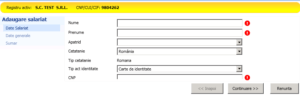
Fill in the following information:
– Name, Surname;
– Stateless, Citizenship;
– Identity document type, Identifier (Personal Identification Number (CNP) / Passport series / Document series) – fill in the Personal Identification Number (CNP) / Passport series / Document series, depending on the type of identity document selected from the list available for the employee’s citizenship.
After entering the information press the Continue button, positioned in the lower right section of the screen.
If in the “Stateless person” field was selected “With the right to reside in a country other than Romania” or in the “Citizenship” field was selected a non-EU/SEE country, the system will open the following screen:
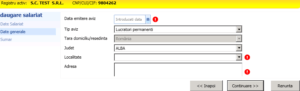
In ecran se completeaza urmatoarele informatii:
– Data emitere aviz: se va completa cu data de emitere a avizului;
In functie de tipul avizului ales, se va completa:
– Data sfarsit aviz: se va selecteaza data de sfarsit a avizului;
– Tip aviz,tara domiciliu, judet, localitate, adresa,
– Mentiuni: se introduc alte informatii legate de salariat (daca este cazul).
Daca in campul Apatrid s-a selectat “Cu drept de sedere pe termen lung in Romania” sau in campul “Cetatenie” s-a selectat o tara UE/SEE , sistemul va deschide urmatorul ecran:
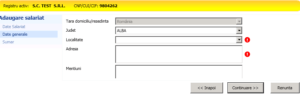
On the screen you fill in the following information:
– Country of domicile, county, city, address, mentions.
After entering the information press the Continue button, positioned in the lower right section of the screen.
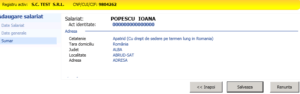
On the screen you fill in the following information:
– Country of domicile, county, city, address, mentions.
To save the entered information click the Save button. If the required fields have not been filled in, the application does not allow the next update step.
After saving the employee, the Revisal application offers the possibility to enter the contract for the employee just added.